• Sql Server Bulk Insert

    Passing a CSV file (separate files through a delimiter, such as a tab) to an SQL table is a frequently required process. There are several ways, importing and exporting the data to the travel assistant of a tool Built-in SQL Server.

  • Import CSV File Into Sql

    It is always necessary to pass the records of a flat file to an SQL server table, since they are needed processed within the database.

Showing posts with label Developing. Show all posts

✅ Example: Import CSV File Into SQL Server Using Bulk Insert (Code)

Passing a CSV file (separate files through a delimiter, such as a tab) to an SQL table is a frequently required process. There are several ways, importing and exporting the data to the travel assistant of a tool Built-in SQL Server.

Sql Server Bulk Insert Example

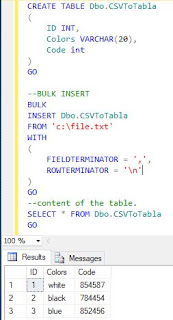
Another way to solve it is through a bulk insert, here is a way simple to do:

1. First we create a CSV file, demolished by commas:

1,white,854587
2,black,784454
3,blue,852456

And we save the file: C:\file.txt
Post Popular

2. Then we create the table where the data will be stored:

CREATE TABLE Dbo.CSVToTabla
(
ID INT,
Colors VARCHAR(20),
Code int
) GO

3. Now we execute the bulk insert, passing the path where the CSV file is located and the delimiter is parameterized, for this case the comma:

--BULK INSERT
BULK
INSERT Dbo.CSVToTabla
FROM 'c:\file.txt'
WITH
(
FIELDTERMINATOR = ',',
ROWTERMINATOR = '\n'
)
GO

4. Finally we consult the data:
Sql Server Bulk Insert Example


Share:

Install and Create React App

When you want to start with a new programming technology we can find many difficulties when starting Our first application.

In this tutorial it is aimed at programmers who want Start exploring React.

Creating React App does not have the function of backend logic, which does is build a flow for the frontend.

Create React App

To Create React Application we must have installed in the machine Node version higher or equal at 8.10 and npm greater than or equal to version 5.6.

To create the project we can choose the following commands:

  • npm

npm init react-app my-app

  • npx

npx create-react-app my-app

  • Yarn

yarn create react-app my-app

Related Posts:

  1. CSV to Sql
  2. Sql Server Linked Server
When executing the command, a directory called my-app is created within the directory, the following structure will be generated:


To open the installation folder, execute the following command:

cd my-app
Share:

Popular Posts

Categories

Recent Posts